A few months ago I fell into a rabbit hole. Not unusually deep, but deep enough that I came out the other side with a full software platform, a better understanding of how AI actually works as a collaborator, and a renewed respect for what designers contribute that these tools still can't replicate.
It started with Claude Code. Using it felt like being 14 again – that specific energy of building things just to see what happens, without worrying too much about whether it was sensible.
The trigger
The whole thing escalated from a simple problem. The head coach of my U14 football team said we should do a feedback round with the players. Fine, I thought – spin up a Typeform, done. Then I saw the free tier caps at ten responses. We have more than ten players.
So I decided to build it myself. I wanted it hosted on my own server in Germany, with full control over the stack, and I wanted to see how far I could get with only Claude Desktop and Claude Code.
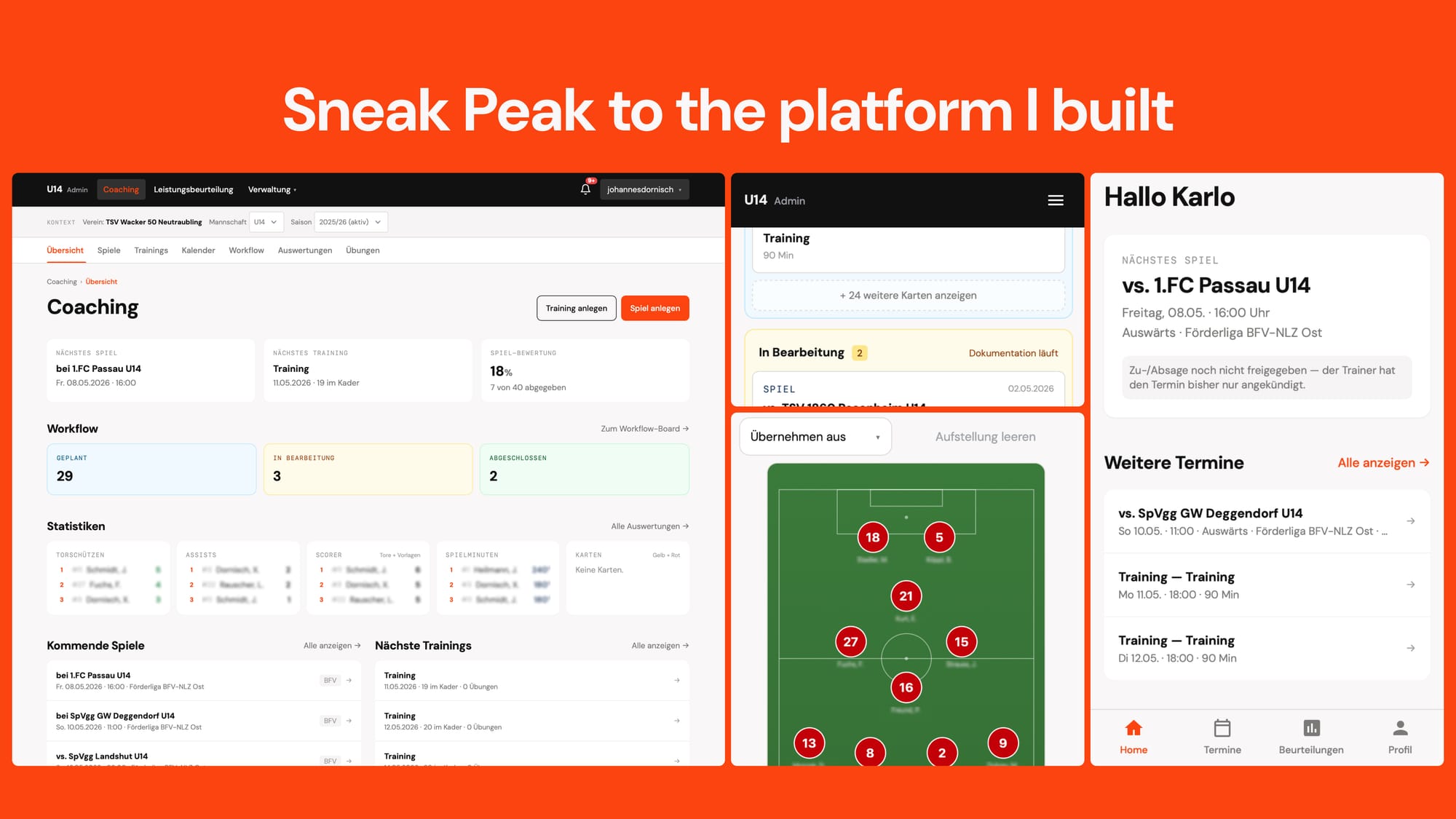
What started as a player feedback form turned into an entire platform – frontend, backend, PWA companion app included. I would have called that feature overload in a client brief. In practice, I simply put in everything I actually needed to coach properly, and because I knew exactly what that was, the scope never felt like the problem.
What I actually built
A fully working end-to-end platform with a responsive coach interface covering performance tracking, team and club management, kanban workflows, calendars, session synchronisation, and multi-user support. Alongside that, a companion PWA for the players: feedback forms, attendance for games and training sessions, accessible from their phones without installation friction. I'm still running and testing both, and they hold up.
What I learned – and this is not for developers
These aren't lessons for engineers. They already know most of this. This is for people coming from a PM or design angle who want to go further, because that's where I came from.
Claude Code thinks like an engineer. That sounds obvious, but the implications are real. Working with it closely felt like working with a developer – in the good and the bad sense. It thought about edge cases I hadn't considered. It went down rabbit holes I didn't want it to, but that it had to, because that's what engineers do. When instructions were ambiguous, it defaulted to technically sound rather than to user-friendly. Twenty years in digital product design taught me why engineers think the way they do, and sparring with Claude Code reminded me of that immediately.
It follows instructions – literally. At some point I wanted to check the implementation against OWASP guidelines and GDPR requirements. It did. The output was fine. So I added both to CLAUDE.md as standing rules, thinking it would keep things balanced in the background. It didn't. It went completely off the rails. Even for a small input field fix, it would plan a full security review and follow every guideline to the letter. The right approach – dedicated agents for those checks – is architecturally sound. But even then, it wants to trigger them constantly. You can control that, but you have to actively manage it.
It lacks creativity and taste. I've written about this a bit separately, and there's a lot of discussion about it in certain circles, but from my experience it holds. Even with a Design.md, a proper design system, and explicit instructions for Claude Design – it misses. The flow doesn't feel right. The visual decisions aren't inspired. It executes reliably, but without the aesthetic judgment that separates something functional from something that actually works for people. That's not a criticism, it's a fact about what the tool is. And it's actually a significant opportunity for designers and concept people, if they can figure out how to integrate that capability at the right point in the process.
It doesn't have eyes. You can work with screenshots and images – I did, especially for bug-fixing, where visual context helps. But on longer runs the token cost gets high fast, and the tool sometimes latches too tightly onto the visual flow it was given without thinking through the technical implications downstream. My middle path: screenshots only when necessary, everything else as written markdown instructions, composed together with Claude Desktop – and that combination held up well over the whole build.
A visual canvas helps – but context decides how much. Working through flows and visual solutions on a canvas, outside of the tool, is worth doing. Not always, and not for everything – but there are moments where you need a visual reference to communicate something before you can write it down precisely. The caveat is that how much this matters depends heavily on what you're building. A B2B back-office tool has different stakes than a consumer app where first impressions carry a lot of weight. Knowing when visual alignment is worth the investment and when written specs are enough is a judgment call, and experience is what makes that call faster.
Write specs for features. For anything that spans multiple components or codebases, write it down properly before starting. Use plan mode. The bigger the feature, the more important it is that the tool understands not just what you want, but why – and what it touches. This is exactly what good design teams do with epics and specs, just with a different recipient at the other end.
Get a real engineer to look at security. Claude Code will write you a security audit if you ask for one, and it's worth doing regularly – especially when user data, passwords, or authentication are involved. But at some point, have an actual engineer review it. In my case that was Tobi, and it made a difference. The tool is good at following security guidelines when prompted. It doesn't have the instinct to flag what it didn't think to check.
What this means for designers and PMs
There are a lot of conversations happening right now about the role of junior and senior designers, about what software development even means when tools like this exist. My take is probably predictable, but I'll say it anyway.
Experience helps. Even a basic familiarity with git changes the experience significantly. But what matters most is something different: creativity, taste, and a building mindset. If your default mode is waiting to be told what to do, that transfers directly to how you'll use these tools – and you'll get the same result you'd get from an uninspired brief. The tool is only as clear as the thinking behind the instructions.
What humans can still do better – significantly better – is the creative and aesthetic judgment: knowing what something should feel like, recognising when a flow is wrong before you can articulate why, iterating on instinct rather than just on function. Claude Code is good at building what you describe. It doesn't have a sense of what's worth building, or how it should feel when it's done.
A few things that actually helped: working with something real rather than a sandbox problem, because the pressure of a real use case forces precision. Collecting inspiration before building – moodboards, references, examples of what you're aiming for – because the tool can only work with what it's been given. And moving quickly while you can, because the cost of experimentation with these tools is increasing, not staying flat.
The rabbit hole was worth it. I came out with a platform I actually use, a clearer sense of where human judgment still matters in the process, and something that felt, at least for a while, like being 14 again.